לפני שמתחילים
מה בונים פה
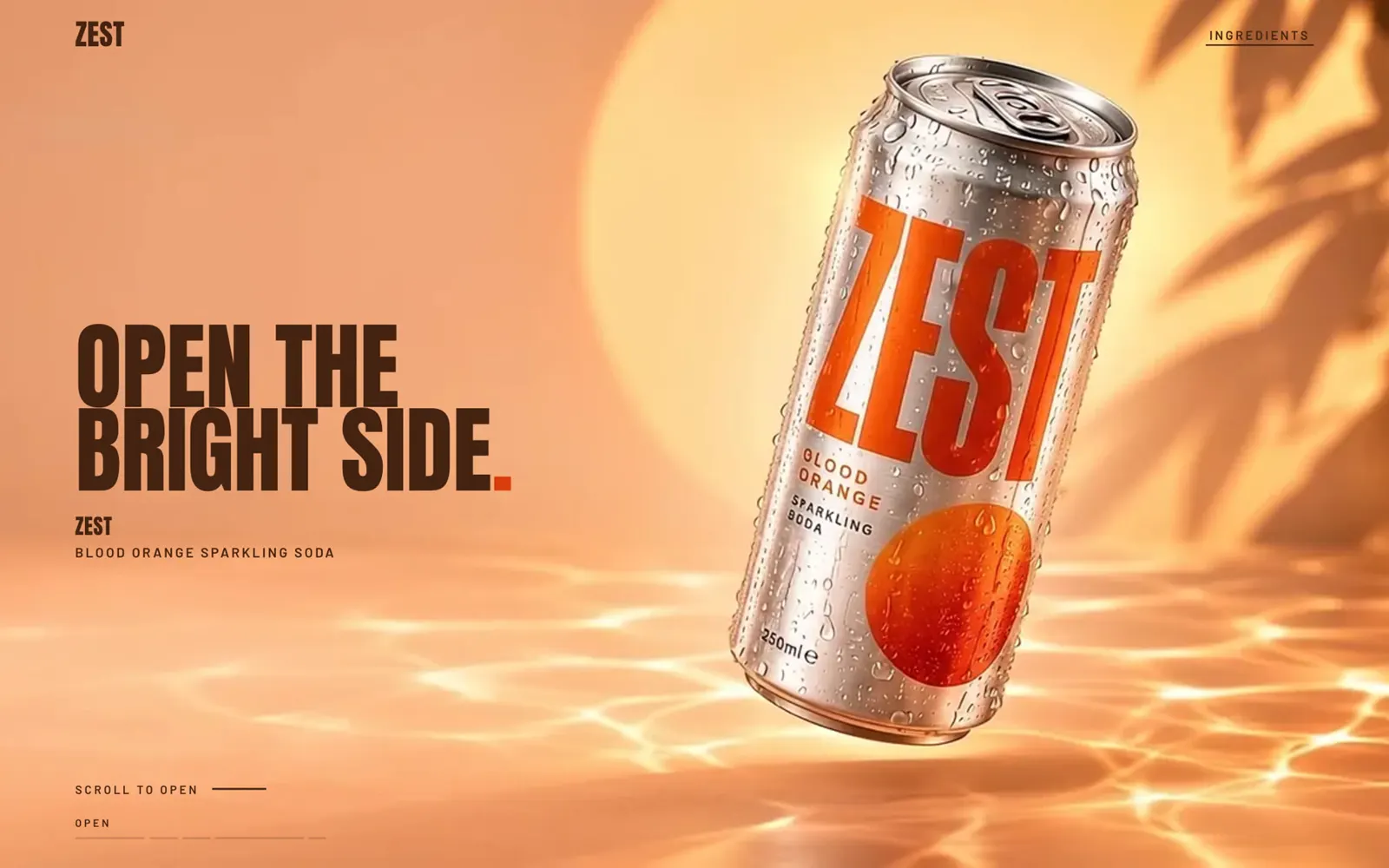
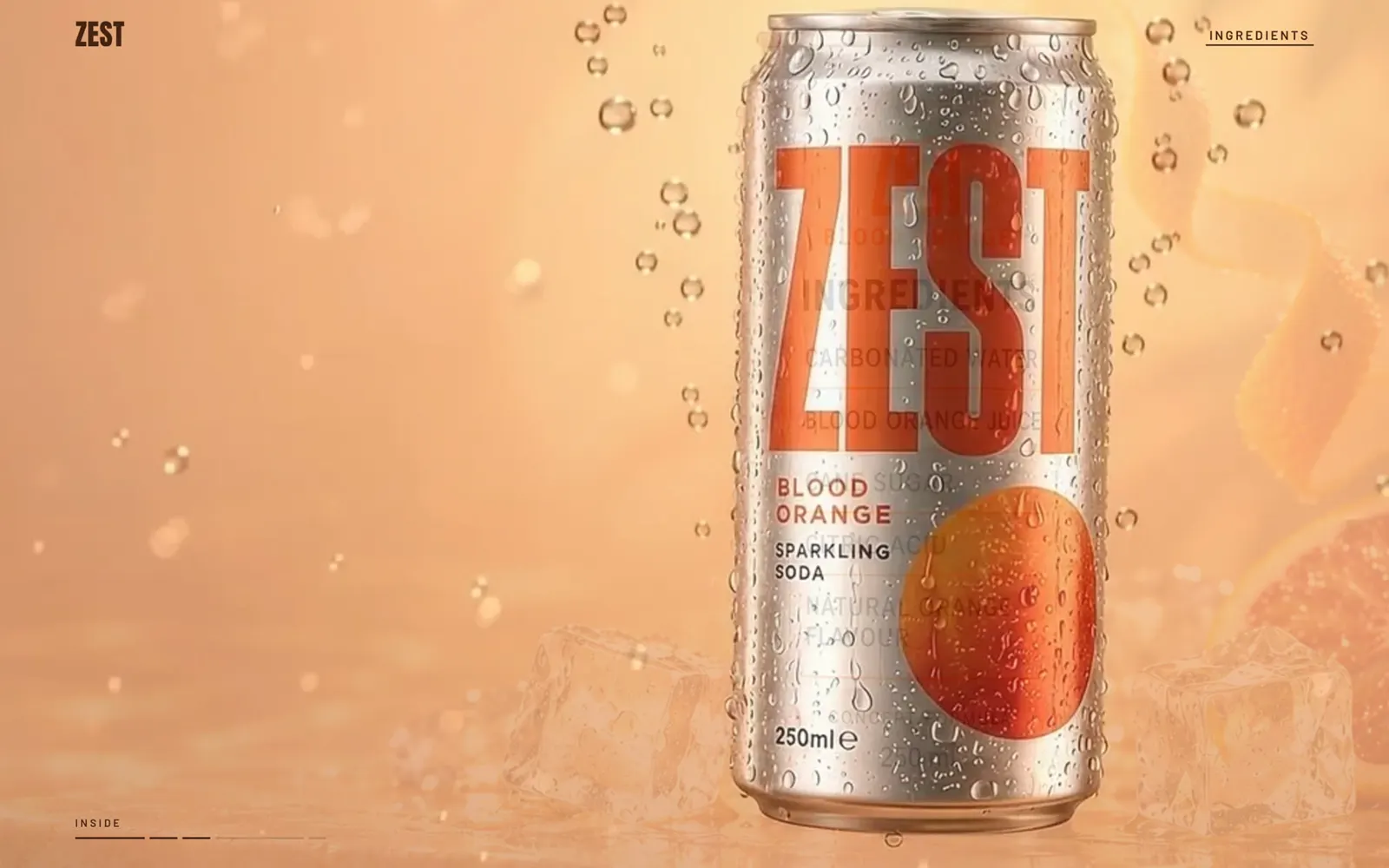
ZEST הוא מותג שהמצאתי: פחית סודה בטעם תפוז דם. אין אותו בסופר, אבל יש לו אתר שבו הגלילה מריצה פרסומת. הפחית נפתחת, נכנסים לתוך הפרי, עוברים דרך הבועות, ובסוף אור של סטודיו קורא את רשימת הרכיבים על הפחית, שורה אחרי שורה, בדיוק בקצב שבו גוללים.
את כל החומרים יצרתי עם AI, ואת הקוד כתב Claude. החלק שלי היה להחליט מה רואים בכל רגע, לכתוב את ההוראות ולבדוק כל שלב. זה מה שהמדריך הזה מלמד: את הסדר, את הפרומפטים, ואת המקומות שבהם זה נשבר אצלי, כדי שאצלכם זה לא יישבר.
מה צריך
| כלי | בשביל מה |
|---|---|
| ChatGPT עם יצירת תמונות | הרעיון, התמונות של כל סצנה, וכתיבת ההוראות לבנייה |
| Google Flow עם המודל Veo 3.1 | להפוך כל תמונה לקליפ של 8 שניות |
| Claude Code | לבנות את האתר, להריץ אותו ולבדוק אותו |
| מחשב עם כרום | לצפות בתוצאה ולבדוק בטלפון |
איך זה עובד, בלי מילים גדולות
המסך נשאר במקום והגלילה מריצה סרט. כל סרטון מפורק לתמונות בודדות, 24 תמונות לכל שנייה, והאתר מציג בכל רגע את התמונה שמתאימה למקום שאליו גללתם. גוללים למטה, הסרט מתקדם. גוללים למעלה, הוא חוזר אחורה. עוצרים, הכל עוצר.
הכותרות הן טקסט אמיתי שיושב מעל התמונה, לא חלק מהסרטון. ככה הן חדות בכל מסך, וגם גוגל וקוראי מסך רואים אותן.
מפת הסרט של ZEST
| פרק | מה רואים | כותרת |
|---|---|---|
| פתיחה | הפחית נפתחת והסודה מתפרצת עם קרח ופלחים | OPEN THE BRIGHT SIDE. |
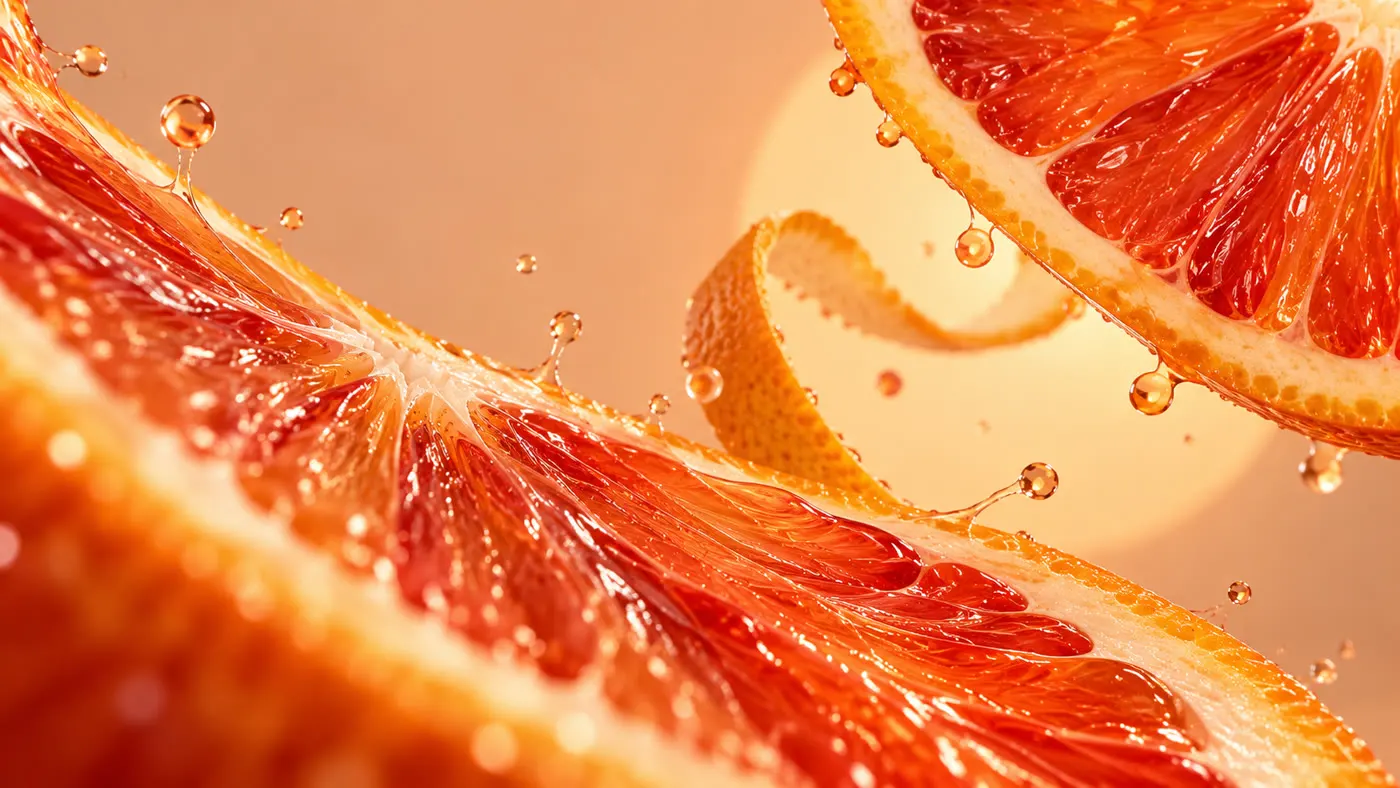
| פרי | צלילה בין פלחי תפוז הדם והקליפה | CITRUS. UP CLOSE. |
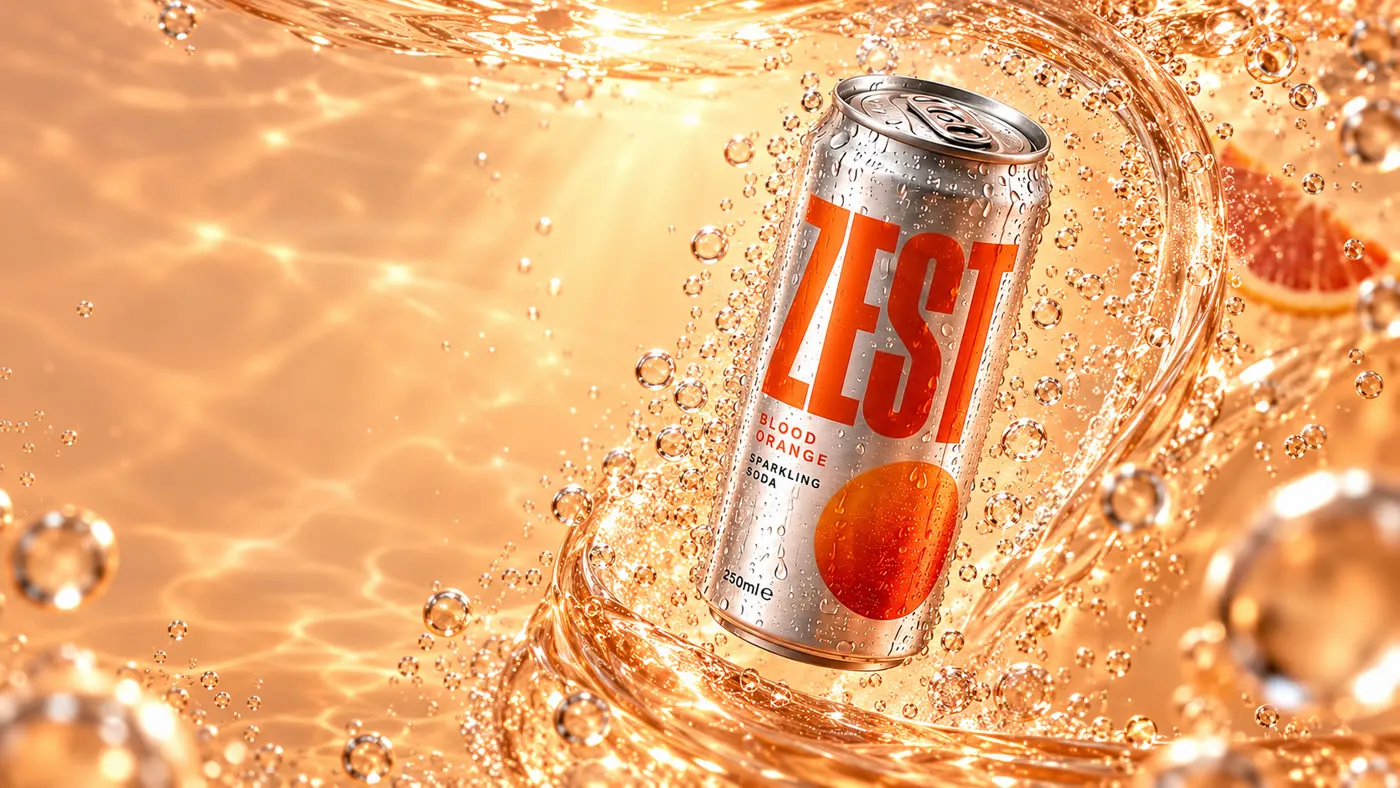
| בועות | הפחית בתוך הסודה, הבועות עולות והכל נרגע | FEEL THE FIZZ. |
| רכיבים | גב הפחית, המצלמה מתקרבת והאור קורא את התווית | WHAT'S INSIDE. |
| סיום | חזרה לחזית הפחית וכפתור לצפייה חוזרת | TURN UP THE ZEST. |
בתכנון היו עוד שני פרקים, קרח ונחיתה על מדף אבן. הם חוזרים לאתר ברגע שהקליפים שלהם מוכנים, ועל זה בהמשך.
שלב 1
בוחרים מוצר שיש בו מה לחשוף
לא כל מוצר מתאים לאתר כזה. מה שעובד הוא מוצר שקורה לו משהו: נפתח, נמזג, מתפרק לשכבות, מסתובב. פחית שנפתחת. אוזניות שמתפרקות לחלקים. שעון שנפתח מבפנים. מוצר שרק עומד יפה ייראה כמו מצגת.
כשאני לא בטוחה, אני נותנת ל-ChatGPT אתר רפרנס עם גלילה כזאת ומבקשת שיציע מוצר ויפרק לי מה צריך.
צירפתי תיקייה של אתר עם גלילה מיוחדת: המסך נעצר והגלילה מריצה סרט של המוצר. אני רוצה לבנות אתר באותו קונספט למוצר אחר. תעזור לי לבחור מוצר דמיוני שיש בו משהו לחשוף תוך כדי גלילה (שכבות, חומר, מנגנון או רגע כמו פתיחה ומזיגה), תציע שם למותג ומשפט אחד שמסכם אותו, ותפרק לי בדיוק אילו תמונות וסרטונים צריך כדי להוציא את זה לפועל.
מנסים לספר את האתר בחמישה משפטים קצרים, משפט לכל פרק. אם כל משפט מראה משהו אחר (גודל אחר, חומר אחר, כיוון מצלמה אחר), יש סרט. אם שלושה משפטים מתארים "המוצר מסתובב יפה", אין.
שלב 2
סרטון הפתיחה קובע את כל השפה
הסרטון הראשון קובע את הצבעים, את האור ואת איך שהמוצר נראה. כל תמונה שתבוא אחריו מקבלת אותו כרפרנס, אז שווה להשקיע בו.

יש שני דברים שאני מבקשת תמיד. הראשון: שהסרטון ייגמר בתמונה רגועה, כי משם מתחיל הפרק הבא. השני: שיהיה בפריים צד אחד שקט, בלי מוצר ובלי פעולה, כי שם תשב הכותרת.
Photorealistic premium beverage commercial still, 16:9. A silver aluminium can of [BRAND], [FLAVOUR], floating at a slight tilt above a softly rippling warm floor, fine condensation droplets on the metal, the [BRAND] wordmark printed in [COLOR] on the can. Warm [COLOR] backdrop with a large soft sun disk and leaf shadows. Keep the left 40% of the frame calm and empty for website typography. Natural sunlight, realistic metal reflections. No text other than the printed packaging, no logos, no watermarks.
Create an 8-second, 16:9 premium beverage commercial shot from the uploaded first frame. Preserve the identical can, its proportions, graphics and printed lettering throughout.

0–2 seconds: the can hangs in the warm light and slowly turns toward the camera.
2–5 seconds: close-up of the lid as the tab lifts and the can opens with a fine cold mist.
5–8 seconds: the camera pulls back as the soda arcs out with ice cubes and fruit slices, settling into a calm, centred composition with a ring of fruit and ice around the can.

Hold the final second steady. Keep one side of the frame quiet for website typography. No new text, no logos or watermarks. Silent video.
שלב 3
תמונות ההמשך: מבקשים הכל בהודעה אחת
כשהיה לי סרטון פתיחה, צירפתי אותו ל-ChatGPT וביקשתי שלושה דברים בבת אחת: תמונות להמשך הסיפור, פירוק של הסרטון לפריימים, ופרומפט לבנייה.
אני רוצה ליצור אתר למשקה הזה שיצרתי. יצרתי לו גם סרטון להירו לגלילה. אני רוצה שתיצור לו עוד פריימים להמשך, ותכתוב לקלוד פרומפט לבניית האתר עם הגלילה כמו שאני רוצה.
מה חזר: ארבע תמונות להמשך (צלילה לתוך הפרי, בתוך הבועות, פיצוץ קרח, נחיתה על מדף אבן), זיפ עם 240 הפריימים של סרטון הפתיחה, ופרומפט ראשון לקלוד.
הורדתי רק חלק מהקבצים. שתי תמונות, הקרח והנחיתה, נשארו בתוך השיחה ולא הגיעו לבנייה, ושני הפרקים שלהן ירדו מהאתר. מאז אני מסיימת כל שלב בבקשה הזאת:
תעשה לי רשימה של כל הקבצים שיצרת בשיחה הזאת, עם שם קובץ לפי התפקיד שלו באתר (למשל 03-cold-snap.png), ותארוז את כולם בזיפ אחד להורדה.
שלב 4
מנפישים ב-Flow, קליפ לכל סצנה
תמונה לא זזה, ואתר כזה חי מתנועה אמיתית. אז כל סצנה עוברת ל-Google Flow והופכת לקליפ של 8 שניות. את הפרומפטים ביקשתי מ-ChatGPT, כי הוא כבר מכיר את התמונות.
איזה תמונות מצריכות הנפשה? תשלח לי את התמונות כאן בצ'אט עם פרומפט מדויק לכל אחת לפלואו.
ההגדרות ב-Flow
| הגדרה | מה בוחרים |
|---|---|
| סוג | Video → Frames |
| תמונה | התמונה של הסצנה כ-Start frame |
| יחס | 16:9 |
| אורך | 8 שניות |
| מודל | Veo 3.1 Quality |
כל קליפ נוצר לבד. את המעברים ביניהם עושה האתר, לא Flow.
Flow נותן לקובץ שם לפי תחילת הפרומפט. קליפ הבועות שלי ירד בשם Camera_moving_around_beverage_can, שנשמע בדיוק כמו קליפ הסיבוב. מיד אחרי ההורדה אני משנה שם לפי התפקיד: 01-citrus-dive.mp4, 02-inside-the-fizz.mp4.


Create an 8-second, 16:9 cinematic image-to-video shot. Use the uploaded image as the exact opening frame and the visual authority for the fruit, composition, lighting and warm peach-orange palette.

One continuous immersive macro camera move through the blood-orange composition.

0–2 seconds: Begin moving gently forward through the existing opening between the citrus wedges. The foreground wedge drifts slightly downward and the upper-right wedge slowly turns a few degrees, revealing natural depth. Suspended juice droplets begin moving along believable slow-motion trajectories.

2–6 seconds: The camera passes closely beside the wet flesh of the lower-left wedge, then travels toward the curling peel in the middle distance. The existing peel slowly unwinds by a quarter turn while retaining its thickness and natural texture. Foreground fruit moves past the lens faster than the background, creating strong physical parallax. Shift focus smoothly from the translucent juice vesicles to the peel. Preserve realistic rind, pith and fruit membranes.

6–8 seconds: Glide through the opening into luminous peach and amber light. Leave a softly blurred citrus edge near the lower corner. Gradually settle the camera during the final half-second, creating a clean transition point.

Animate the fruit, peel and droplets independently in a coherent three-dimensional scene. Preserve the established photographic realism and exposure. Continuous measured movement, crisp detail and restrained motion blur.

No can, additional fruit, newly appearing objects, cuts, dissolves, rubbery fruit, melting geometry, flicker, captions, logos or watermarks. Silent video: no speech, music or sound effects.
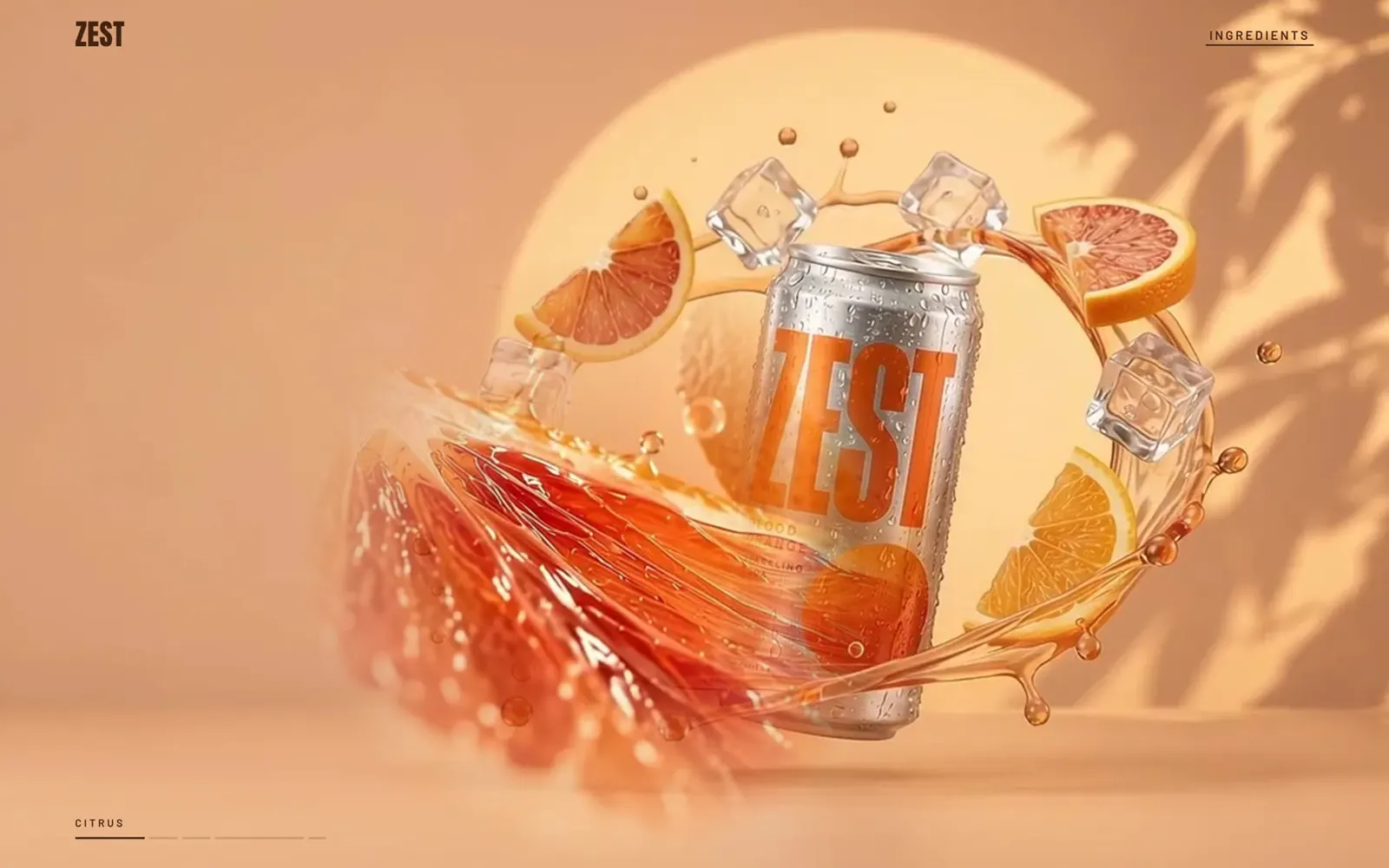
Create an 8-second, 16:9 premium beverage commercial shot. Use the uploaded image as the exact first frame. Preserve the identical ZEST can, its proportions, silver material, orange graphics, condensation, lid and printed label throughout.

One continuous shot inside the sparkling amber liquid.

0–2 seconds: The existing streams of small carbonation bubbles rise naturally around the can. The transparent liquid ribbon begins flowing along its existing curve, sweeping upward from the lower foreground and around the right side. Keep the front label unobstructed.

2–6 seconds: Move the camera through a smooth, shallow 12-degree arc around the front of the can while gently pushing closer. Keep the label facing the viewer and the entire can inside the frame. The can drifts upward by approximately five percent of its height and slowly rolls a few degrees toward upright. Its shape remains rigid. The liquid ribbon flows behind it, changing shape like real moving water rather than rotating as a solid ring. Nearby bubbles pass the lens with natural refraction and depth.

6–8 seconds: Settle into a clear three-quarter product view at center-right. Reduce camera movement while maintaining subtle rising bubbles and liquid flow. Preserve the quiet left-hand area for later website typography.

The physical packaging must remain unchanged: ZEST, BLOOD ORANGE, SPARKLING SODA and 250ml. Keep the existing lid condition. Warm peach sunlight, realistic metal reflections, detailed liquid and stable lighting.

No full rotation, duplicated cans, label changes, warped lettering, objects passing through the can, cuts, speed ramps, flicker or added text. Silent video, no music or sound effects.
Create an 8-second, 16:9 high-end slow-motion beverage shot. Use the uploaded image as the exact opening frame. The image already captures an ice burst in progress: continue that existing action naturally.

Preserve the identical silver ZEST can, orange graphics, condensation, lid, proportions and label. Keep the entire can visible at center-right.

0–2 seconds: The existing fractured ice pieces continue separating outward from their current positions. Small droplets follow individual ballistic paths. A thin splash spreads across the wet surface beneath the can. Keep all major shards behind or beside the product, leaving the front label readable.

2–6 seconds: Gravity gradually brings the ice pieces down around the can. Each fragment retains its own shape and moves independently with believable mass and inertia. Small pieces contact the wet surface and create delicate secondary splashes. The can gently straightens from its starting tilt and settles onto the surface without bouncing or deforming.

During this action, the camera performs one smooth low-angle pullback with a subtle sideways arc, revealing the scale of the ice and the reflections. Maintain a front-facing product view and clean peach space on the left.

6–8 seconds: Let the movement resolve into a composed product shot. The large fragments settle, small droplets finish falling and water ripples continue briefly. Stabilize the camera for the final half-second.

Retain the warm peach sunlight, transparent ice, internal ice fractures and silver reflections. Keep all physical package lettering unchanged.

No new explosion, extra ice appearing, glass-like shattering into hundreds of particles, hovering fragments after they settle, can deformation, label drift, camera shake, cuts or added typography. Silent video.
Create an 8-second, 16:9 elegant closing product shot. Use the uploaded image as the exact opening frame and preserve its composition, product identity, lighting and warm peach palette.

The ZEST can remains upright and physically grounded on the wet stone ledge throughout. Preserve its precise shape, silver finish, orange graphics, lid and printed lettering. Keep the full can visible on the right and the left forty percent calm and open for website typography.

0–3 seconds: Begin a very smooth, shallow camera arc around the front of the composition, combined with a restrained forward dolly. Create real parallax between the foreground ice, the can, the orange half and the peel behind it. Keep the product label facing the viewer.

3–6 seconds: Continue the camera move slowly. Two existing condensation droplets slide naturally down the metal surface. Small water ripples travel across the ledge. The existing orange-peel spiral makes a slight, graceful movement in a light breeze, retaining its shape and position behind the product. Leaf shadows shift subtly across the back wall. The fruit and can remain grounded.

6–8 seconds: Ease the camera into its final composition, completing no more than a seven-percent increase in product size. Hold the camera steady for the final second while only tiny water and condensation movements remain.

Photographic realism, stable exposure, crisp packaging, natural reflections and restrained depth of field. Keep ZEST, BLOOD ORANGE, SPARKLING SODA and 250ml unchanged.

No lifting or spinning can, new objects, moving fruit, dramatic splash, label distortion, flicker, cuts, fade to black, captions or watermarks. Silent video, without music, speech or sound effects.
שלב 5
הרגע שבו האתר עושה מה שסרטון לא יכול
עד כאן זה סרט. מה שהופך את זה לאתר הוא התווית: הפחית מסתובבת, המצלמה מתקרבת, ואור עובר על הרכיבים בדיוק בקצב שבו גוללים. עוצרים, האור עוצר. גוללים למעלה, הוא חוזר.
אני רוצה תמונה של האחרונה עם תווית של המרכיבים, ובפרומפט אני רוצה שהפחית תסתובב ויהיה קלוז אפ על הרכיבים, עם תאורה על כל רכיב לפי תזמון גלילה.
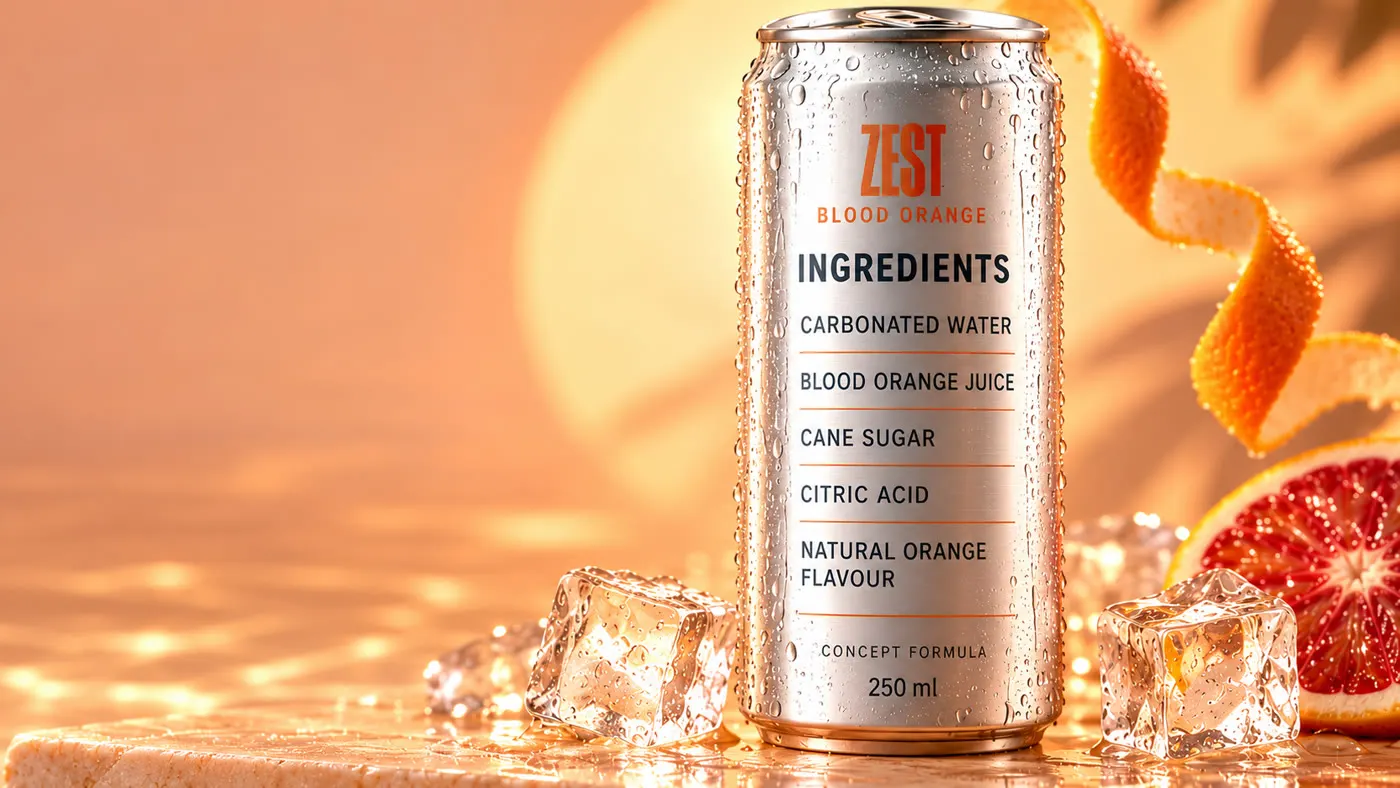
ההחלטה הכי חשובה בשלב הזה: Flow עושה רק את הסיבוב וההתקרבות, והאור לא נכנס לסרטון. אור שבתוך הסרטון לא יכול לעצור ולחזור עם הגלילה, ואותיות בסרטון של AI זזות קצת מפריים לפריים. אז לקריאה האתר עובר לתמונה החדה, והאור מצויר מעליה, בקוד.
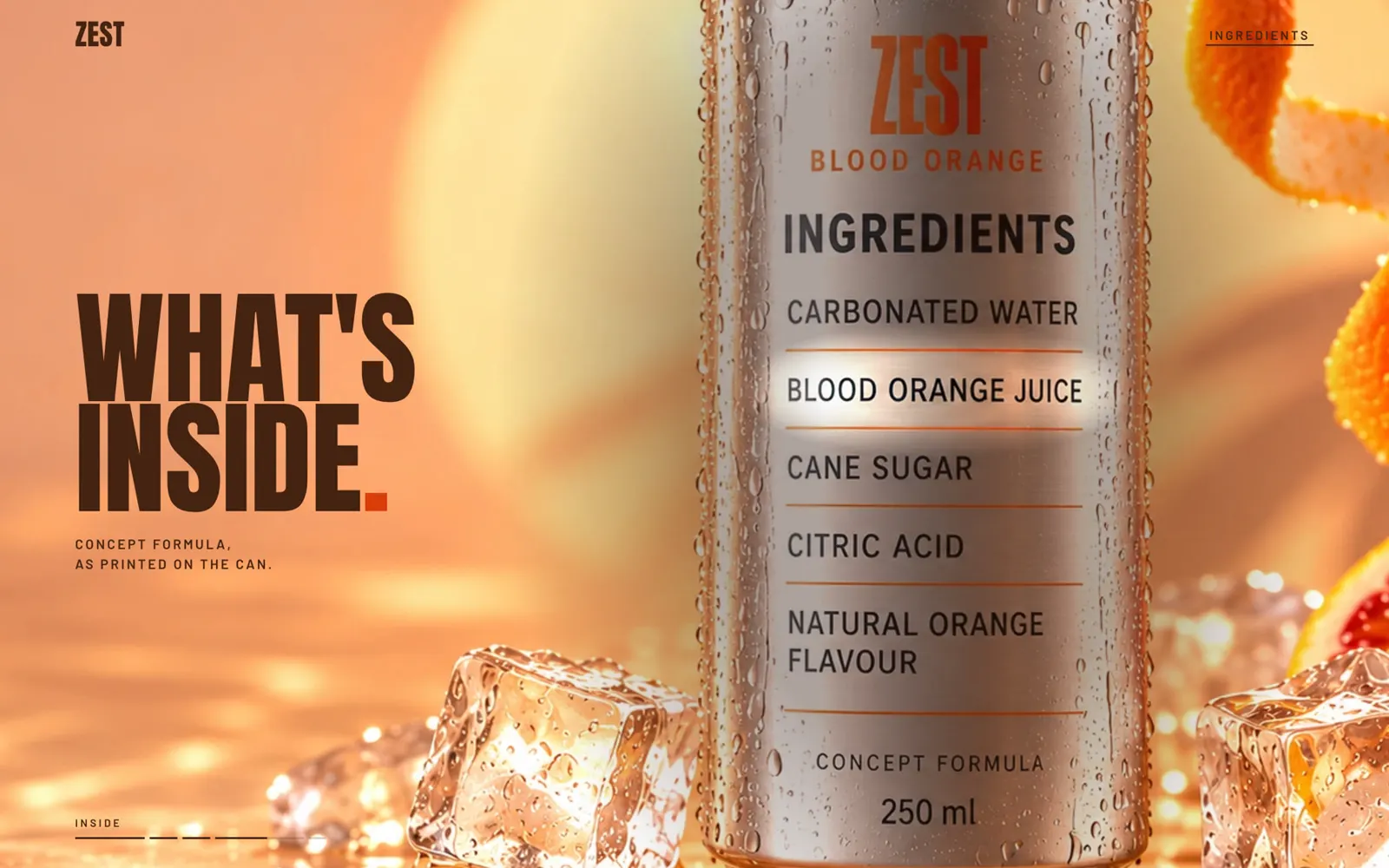
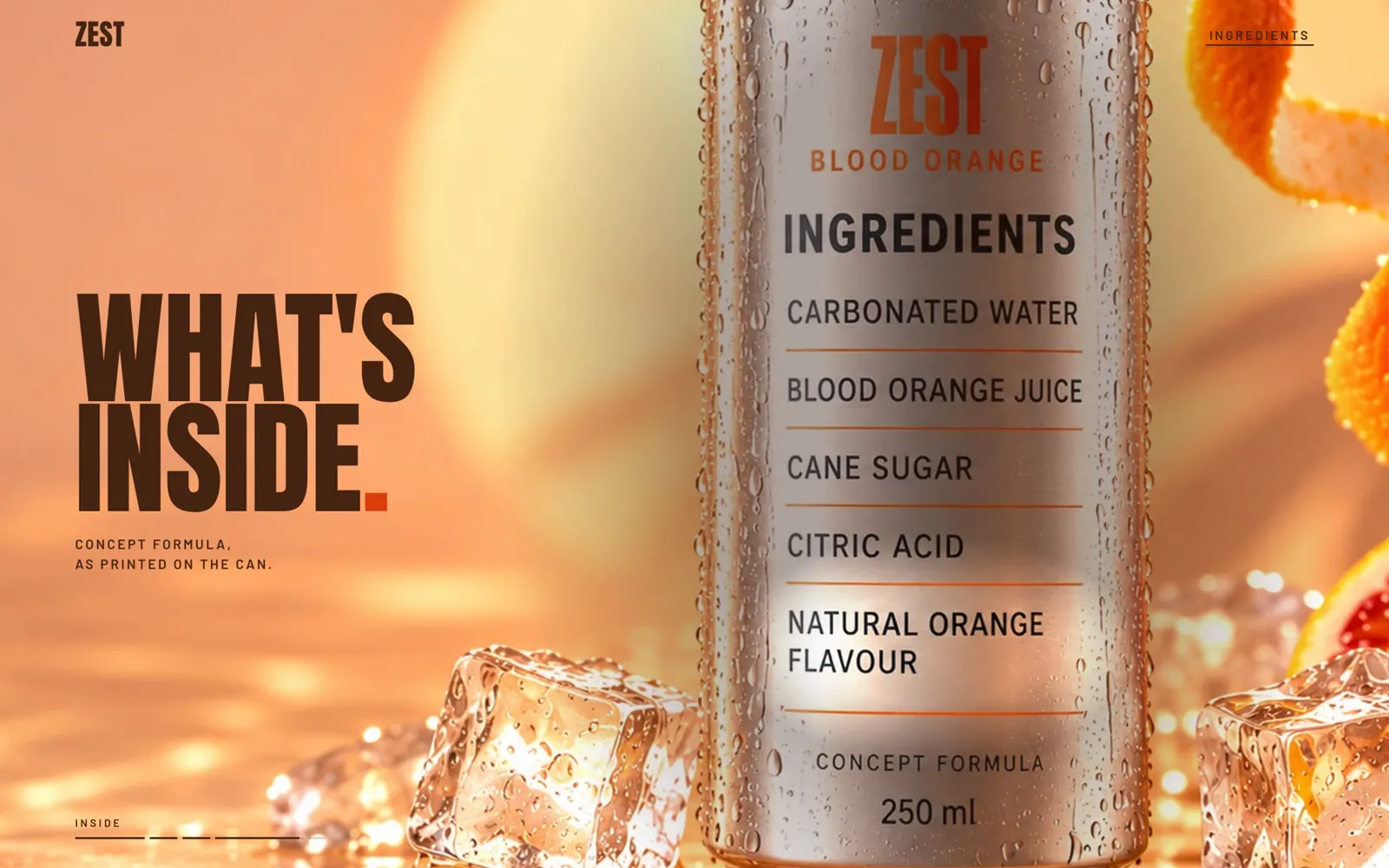
ב-Flow מעלים כאן שתי תמונות: הפחית מלפנים על המדף כ-Start frame, ותמונת הגב כ-End frame. ככה Flow יודע בדיוק מאיפה הסיבוב מתחיל ואיפה הוא נגמר.
הסיבוב לגב הפחית Google Flow
Create an 8-second, 16:9 photorealistic premium beverage product shot using the supplied first and last frames.

FIRST FRAME: the front-facing ZEST can on the wet peach stone ledge.
LAST FRAME: the supplied close-up of the same can's rear ingredient label.

One continuous shot: a precise half-turn of the physical can, followed by a cinematic camera push toward the ingredients.

0–3.2 seconds:
The can rotates smoothly clockwise by exactly 180 degrees around its own vertical axis. Its base remains in the same position on the stone. The camera stays stationary during this rotation. The front artwork moves naturally around the cylindrical surface until the rear ingredient label faces the viewer.

Both printed sides remain physically attached to the aluminium throughout. Do not dissolve, replace or morph the front artwork into the rear label. Preserve the can's dimensions, lid, rims and condensation. The ice, orange half, peel and background remain in place.

3.2–7.2 seconds:
Once the rear faces the camera, stop the rotation completely. Move the camera forward in one smooth optical dolly toward the ingredient label, progressively matching the supplied end-frame composition. Keep the label in sharp focus and preserve realistic depth and parallax. The whole ingredient list must remain visible.

7.2–8 seconds:
Settle into the supplied end frame and hold a steady, sharply readable composition. Use balanced soft illumination across every ingredient row. Preserve the exact rear-label wording and its CONCEPT FORMULA footer.

Maintain the original warm peach sunlight, brushed silver texture and photographic realism. All movement should be controlled and continuous, suitable for forward and reverse video scrubbing.

No ingredient spotlights baked into this clip: those will be controlled interactively on the website. No cuts, camera orbit, additional rotations, floating can, distorted lettering, new objects, captions or watermarks. Silent video.
התזמון בתוך פרק הרכיבים
| חלק מהפרק | מה קורה |
|---|---|
| 0% עד 20% | הפחית מסתובבת מהחזית לגב |
| 20% עד 40% | המצלמה מתקרבת לתווית |
| 40% עד 52% | האור על CARBONATED WATER |
| 52% עד 64% | האור עובר ל-BLOOD ORANGE JUICE |
| 64% עד 76% | האור עובר ל-CANE SUGAR |
| 76% עד 88% | האור עובר ל-CITRIC ACID |
| 88% עד 100% | האור על NATURAL ORANGE FLAVOUR, שתי השורות יחד |
שלב 6
הבריף לקלוד: פרומפט אחד מאוחד
בסוף ביקשתי מ-ChatGPT לאחד את כל ההוראות לפרומפט אחד. את הפרומפט הזה הדבקתי ב-Claude Code, יחד עם כל הקבצים.
תכתוב לי את הפרומפט המלא לקלוד.
הבריף המלא נמצא בנספח. ככה הוא בנוי, ולמה כל חלק שם:
| חלק בבריף | למה הוא שם |
|---|---|
| החוויה | מה מרגישים בגלילה. בלי זה מקבלים דף נחיתה רגיל עם אנימציות |
| מיפוי הנכסים | לכל קובץ יש תפקיד, וקלוד בודק מה הגיע ומה חסר לפני שהוא כותב קוד |
| כיוון ויזואלי | פלטה, טיפוגרפיה, ואיפה מותר לכותרת לשבת כדי לא לכסות את המוצר |
| התנהגות הגלילה | עצירה עוצרת, אחורה חוזר, קפיצה ורענון בונים מחדש את אותה תמונה |
| סדר הפרקים | כמה מהגלילה מקבל כל פרק. זה הקצב של הסרט |
| פרק התווית | התזמון המדויק של הסיבוב, ההתקרבות והאור |
| ביצועים | שהאתר לא ינסה לטעון מאות תמונות בבת אחת ולא ייתקע |
| מובייל ונגישות | סרטון רוחבי במסך צר, וגרסה סטטית למצב של תנועה מופחתת |
| אמת על המוצר | בלי מספרים, ביקורות או טענות בריאות שהומצאו |
| בדיקות ומסירה | לדווח רק על מה שנבדק באמת, ולהגיד מה חסר |
בבריף כתוב שאם קליפ חסר, בונים את הפרק עם התמונה ומדווחים, ולא מזייפים תנועה. בגלל המשפט הזה האתר נבנה עד הסוף גם כשהיו חסרים לי שלושה קליפים, ושום דבר לא נראה מזויף.
שלב 7
מה קורה בבנייה, ומה לבקש
כאן Claude עובד ואני בודקת. אלה הדברים שקרו בבנייה של ZEST, ומה אני מבקשת כדי שיקרו גם אצלכם.
בדיקת חומרים לפני קוד
Claude פתח כל קובץ, מדד אותו ובנה טבלה: מה סופק, מה חסר, ומה כל קובץ באמת. כך התברר שהגיעו שני קליפים מתוך חמישה, ושהקליפ עם השם של הסיבוב הוא בכלל הבועות.
לפני שאתה כותב קוד, תפתח כל קובץ ששלחתי, תמדוד אותו ותגיד לי מה כל אחד באמת ומה חסר. אל תמציא קובץ שלא קיים, ואל תזייף תנועה של קליפ שלא הגיע.
פירוק לפריימים
שלושת הסרטונים פורקו ל-622 פריימים אמיתיים בגודל 1280 על 720. האתר לא טוען את כולם מראש: הוא טוען את מה שקרוב למקום שבו גוללים, בכיוון הגלילה, ומחזיק בזיכרון בערך 24 תמונות בכל רגע. בזמן שתמונה נטענת, התמונה הקודמת נשארת על המסך, כך שאף פעם אין מסך ריק.
מעברים שממשיכים את הסיפור
בין פרק לפרק אין "פייד" גנרי. מהפתיחה לפרי, עיגול גדל מתוך פלח התפוז שבפריים האחרון. מהפרי לבועות, הסודה עולה מלמטה. מהבועות לתווית, הפחית נדחפת בעדינות עד שהיא יושבת בדיוק איפה שהפחית בתמונת הגב יושבת, ואז מעבר קצר מהחזית לגב.
טקסט רק במקום שקט
כל כותרת נבדקה מול הפריימים עצמם. OPEN THE BRIGHT SIDE. יוצאת מהמסך לפני שהמצלמה קופצת לקלוז אפ על המכסה. CITRUS. UP CLOSE. נכנסת רק אחרי שהפרי עוזב את הצד השמאלי של המסך.
תבדוק כל כותרת מול הפריימים שמתחתיה. כותרת לא מכסה את המוצר, לא את האותיות על האריזה ולא את הפעולה. אם אין מקום שקט באותו רגע, תזיז את הכותרת לרגע אחר בגלילה.
האור על התווית
Claude מדד את המיקום של כל שורה ישירות מהפיקסלים של תמונת הגב, ושמר אותו כאחוזים מהתמונה. ככה האור יושב על השורה המודפסת בכל גודל מסך, ולא על נקודה קבועה במסך. בגרסה הראשונה האור הלבין את האותיות, אז עברנו לאור שמבהיר את המתכת ומשאיר את הדיו שחור.
האור חייב לשבת על השורה המודפסת עצמה, בכל גודל מסך. תמדוד את מיקום השורות מהתמונה. הדיו נשאר שחור וקריא, בלי ערפל לבן ובלי מלבן מודגש. השורות שלא מוארות נשארות קריאות, רק פחות בולטות.
הטלפון
הסרטונים רוחביים והמסך צר. אם פשוט ממלאים את המסך, המוצר נחתך. אז בטלפון התמונה יושבת במסגרת, הצבע מסביב נמדד מהסרטון עצמו כך שהמעבר רך, והכותרת יושבת מעליה. בפרק התווית התמונה נחתכת סביב הפחית, כדי שהרכיבים יהיו גדולים וקריאים.
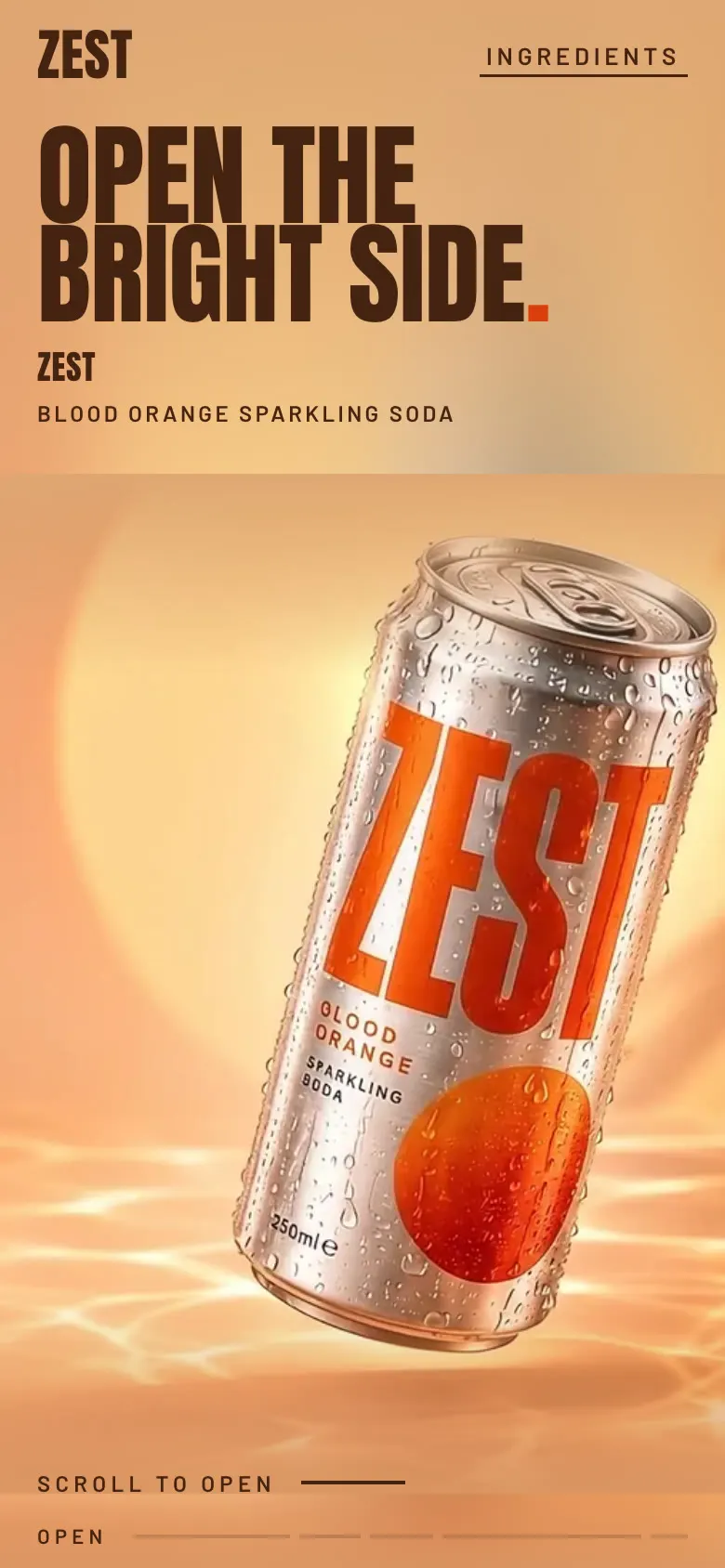
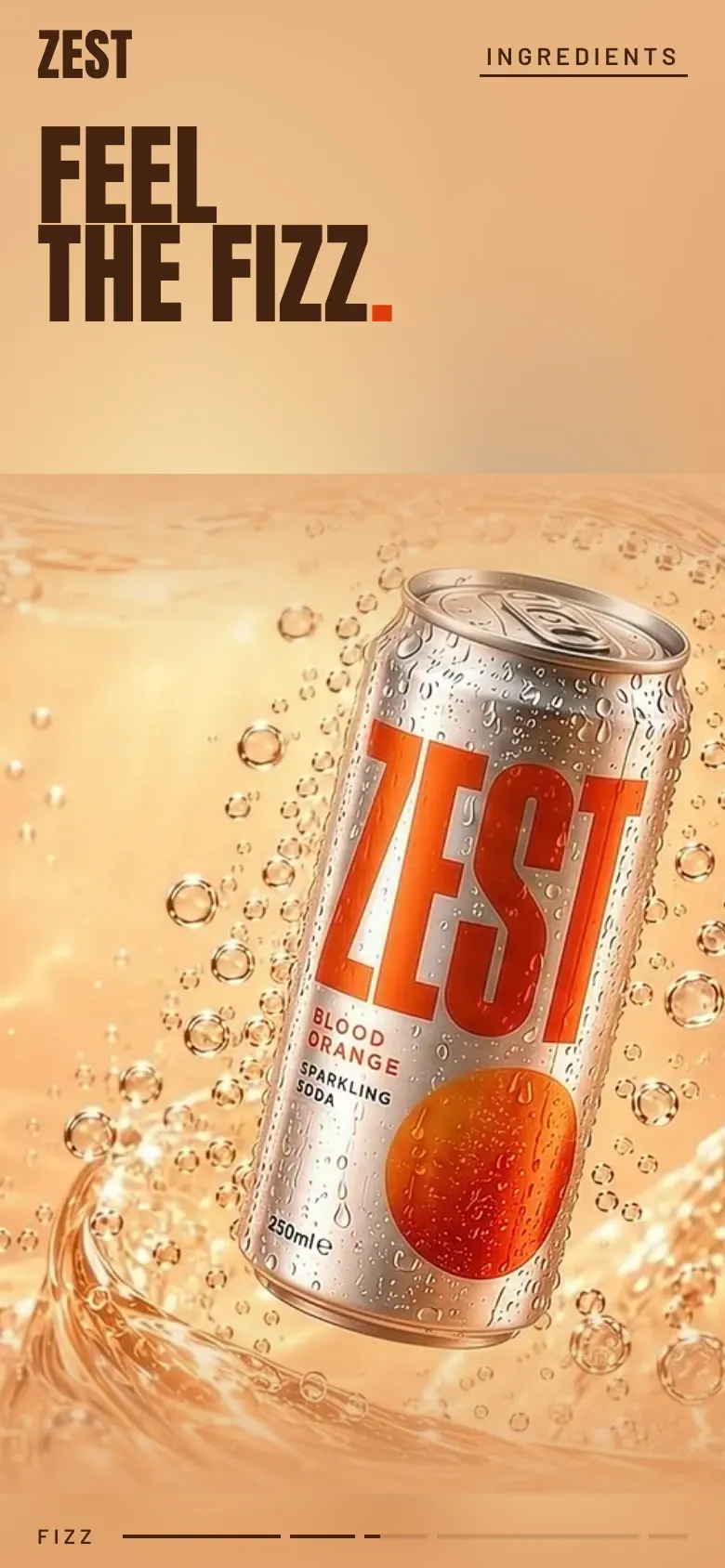
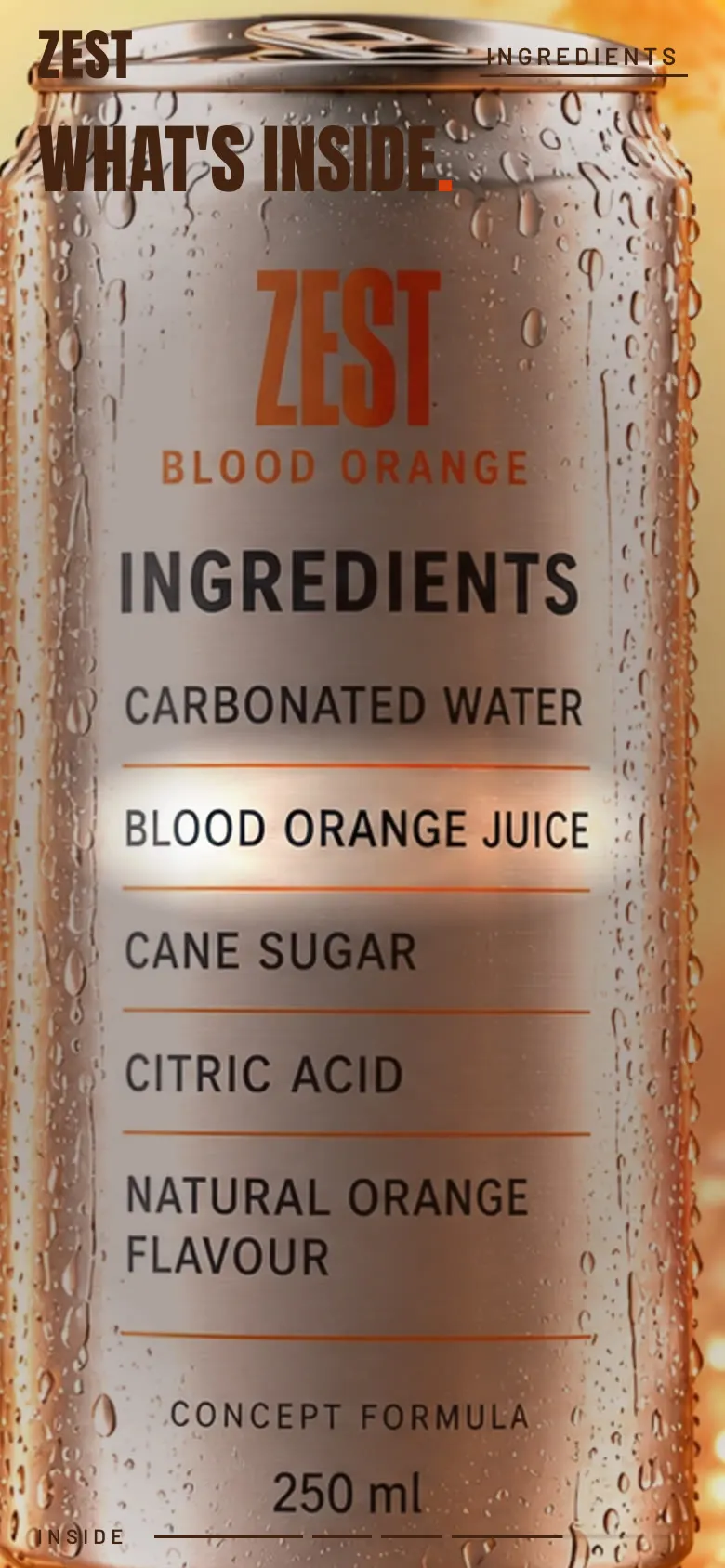
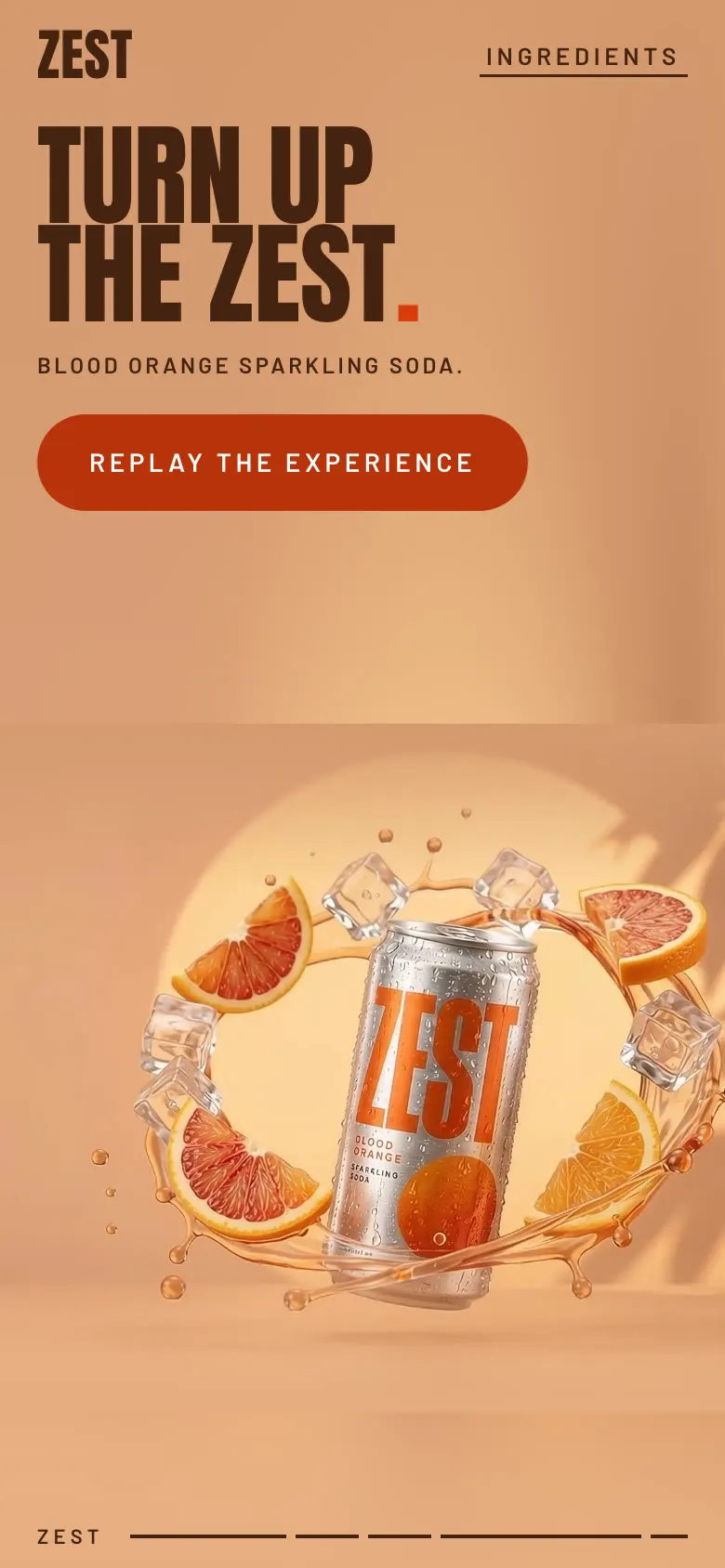
בטלפון אל תחתוך את המוצר. אם אין חיתוך בטוח, תכניס את התמונה למסגרת בצבע שתואם לסרטון ותשים את הכותרת מעליה. בפרק התווית הקריאות של הרכיבים חשובה יותר מהקישוטים מסביב.
שלב 8
בודקים לפני שמראים למישהו
אני לא מסתפקת ב"נראה טוב". אני מבקשת בדיקה עם מספרים וצילומי מסך.
תריץ את האתר בדפדפן אוטומטי ותבדוק: גלילה קדימה ואחורה במהירות רגילה ומהירה, עצירה באמצע, קפיצה עם הקישור לרכיבים, רענון באמצע הדף, מסך ברוחב 390, מצב תנועה מופחתת ורשת איטית. תגיד לי כמה פעמים הוצג הפריים הנכון, אם היה מסך ריק, ותראה לי צילומי מסך של כל מעבר.
מה יצא בבדיקה של ZEST
| בדיקה | תוצאה |
|---|---|
| גלילה רגילה | הפריים המדויק הוצג ב-100% מהפעמים |
| גלילה מהירה מאוד | 80 עד 87% פריים מדויק, בשאר הפעמים הפריים הקרוב. אף פעם לא מסך ריק |
| עצירה | אפס תנועה אחרי שעוצרים |
| רענון באמצע הדף | חוזר בדיוק לאותה נקודה בסיפור |
| קישור לרכיבים | נוחת על השורה הראשונה כשהיא מוארת |
| טלפון ברוחב 390 | המוצר שלם, אין גלילה הצידה |
| תנועה מופחתת | גרסה של תמונות סטטיות עם כל הכותרות וכפתור חזרה |
| רשת איטית | הכותרת מופיעה מיד, והתמונה האחרונה נשארת עד שהבאה נטענת |
מה שבדיקה אוטומטית לא מחליפה: לפתוח את האתר באייפון אמיתי ולגלול עם האצבע. את זה עושים ביד.
בקיצור
מה השתבש אצלי, ומה עושים מעכשיו
| מה קרה | מה עושים מעכשיו |
|---|---|
| שתי תמונות נשארו בתוך הצ'אט ולא הגיעו לבנייה | בסוף כל שלב מבקשים רשימת קבצים וזיפ אחד |
| קובץ מ-Flow ירד עם שם מטעה | משנים שם לפי תפקיד מיד אחרי ההורדה |
| קליפ הסיבוב לא היה מוכן בזמן | בונים עם התמונה ומעבר כן, ומחליפים כשהקליפ מגיע. לא מזייפים סיבוב |
| בטלפון נשאר פס צבע ריק מעל התמונה | צבע רקע קבוע שנמדד מהסרטון, והאור של התמונה ממשיך לתוכו |
| האור על התווית הלבין את האותיות | אור שמבהיר את המתכת במקום שכבה לבנה מעל |
| האתר נפתח באמצע הסיפור | האתר זוכר מיקום רק ברענון. כניסה רגילה מתחילה מההתחלה |
זה כל התהליך. הכלים עושים את העבודה הכבדה, אבל ההחלטות נשארות אצלכם: מה רואים בכל רגע, איפה יושבת הכותרת, ומה האתר עושה שסרטון לא יכול.
נספח א
הבריף המלא לקלוד
זה הפרומפט כפי שהדבקתי אותו ב-Claude Code, יחד עם סרטון הפתיחה, הקליפים, התמונות ותמונת הגב. למוצר אחר משנים את השם, הפלטה, הכותרות והפרקים, והמבנה נשאר.
Build the complete ZEST website using the attached assets. Implement the site, run it, inspect the result and refine it. This is the consolidated brief and supersedes older instructions included inside the asset ZIP.

THE EXPERIENCE
Create a cinematic website for ZEST, the silver-can blood-orange sparkling-soda concept in the supplied film. Scrolling should feel like directing a premium beverage commercial: the can opens, we travel through citrus, bubbles and ice, the can lands, rotates to reveal its back, and the camera approaches the ingredient label. A moving spotlight then reveals each printed ingredient according to scroll position.
The result should feel tactile, bold, immersive and carefully choreographed. Use real motion from the supplied videos. Make each scene advance the story, with a clear change of scale, material or camera direction. Avoid a template landing page, stacked cards, product grids, sliders and disconnected fade-in sections.
Use the existing project stack if provided. Otherwise use React, TypeScript, Vite and GSAP ScrollTrigger. Keep all website copy in English.

1. INSPECT AND MAP THE ASSETS
Inspect every supplied file before implementing the timeline. Create one media configuration that records the actual paths, dimensions, durations, frame rates, posters and usable trim ranges.
These are logical asset names; map differently named uploads to the correct roles:
* hero-original.mp4: the original ZEST film, 1920 x 1080, 10 seconds, 24 fps.
* hero-frames/frame-0000.webp through frame-0239.webp: if the kit is attached, these 240 consecutive 1280 x 720 frames were extracted from that exact film.
* hero-poster.png and hero-end.png: the original film's first and last frames, if supplied.
* 01-citrus-dive: the close-up of blood-orange flesh, floating droplets and curling peel.
* 02-inside-the-fizz: the can surrounded by bubbles and a flowing amber liquid curve.
* 03-cold-snap: the can surrounded by fractured clear ice and droplets.
* 04-the-landing: the front-facing can on the wet peach stone ledge, with ice, blood orange and orange peel.
* 05-turn-to-ingredients.mp4: the new clip that rotates the can from front to back and pushes toward the ingredient label.
* 05-back-label.png: the supplied high-resolution rear view with the ingredient list and CONCEPT FORMULA footer.
For scenes 01–04, use the supplied animated MP4 when available and retain the corresponding still as its poster/fallback. Those continuation videos are separate assets and may not be included in the original ZIP. Do not assume that an image is a video or that a missing clip has been supplied.
If a continuation clip is missing, implement its scene with the supplied still and restrained camera framing, and report the missing motion asset in the handoff. If the rotation video is missing, use the rear-label still temporarily; do not fake a physical can rotation by stretching or flipping a photograph. Keep building the rest of the experience.
Preserve the exact product identity. Do not invent another can, flavour, package, stock photograph or 3D model.

2. VISUAL DIRECTION
Follow the assets: warm peach and apricot, blood orange, brushed silver, transparent ice, condensation, liquid and natural sunlight.
Starting palette:
* Peach: #E7A06F
* Pale apricot: #FFE0AB
* Blood orange: #D83D0A
* Deep warm text: #452311
Adjust surrounding colours to the actual media edges. Avoid black letterboxing. Natural photographic light gradients should remain intact.
Use oversized, tightly spaced, very condensed uppercase display typography, paired with a restrained readable sans-serif. Set intentional line breaks. Keep website text as live HTML and preserve the physical packaging lettering in the media.
Place desktop copy primarily in the quiet left-hand areas, keeping the can and important action unobstructed. Use fewer words and larger imagery. Avoid glass cards, heavy borders, unrelated gradients, purple/blue styling and decorative icon collections.
The header should contain a small ZEST wordmark and one working link to the ingredient chapter. Add a subtle chapter progress indicator. Keep navigation minimal and functional.

3. SCROLL BEHAVIOUR
Use native page scrolling, one viewport-height visual stage and one master timeline. Pin the outer stage once and animate its children. Do not combine competing sticky and pin systems.
Scrolling is the playback controller:
* Downward scroll advances the video frames and effects.
* Upward scroll reverses them.
* Stopping scroll stops the motion and the ingredient spotlight.
* Jumping to any scroll position reconstructs the correct scene immediately.
* Reloading halfway down the page preserves the appropriate visual state.
No autoplay, looping videos, scroll snapping, long inertial catch-up or timer-driven animations.
Start with approximately twelve viewport heights of active scroll travel on desktop and nine on mobile. Tune the distance after checking the actual motion and reading time. Avoid dead stretches. Use responsive measurements and clean up animation resources on unmount.

4. COMPLETE CHAPTER ORDER
Use this initial allocation of the master timeline:
0–25%: ORIGINAL HERO
Scrub through the entire original film. If using the supplied sequence, select frame round(localProgress * 239).
Opening headline: "OPEN THE / BRIGHT SIDE."
Descriptor: "ZEST / BLOOD ORANGE SPARKLING SODA"
Initial hint: "SCROLL TO OPEN"
Clear the large copy before the lid close-up and the busiest liquid/fruit action. Near the final wide shot, reveal "BLOOD / ORANGE." only where it does not overlap the product.
25–35%: CITRUS DIVE
Scrub the citrus clip, travelling between wet fruit and curling peel.
Headline: "CITRUS. / UP CLOSE."
Use the actual quiet area of the image for type. If only the still exists, use a small forward push and diagonal pan without pretending that the fruit itself is animated.
35–45%: INSIDE THE FIZZ
Scrub the bubble-and-liquid clip. Let the real physical movement dominate.
Headline: "FEEL / THE FIZZ."
Keep the label clear. Avoid adding generic decorative bubbles over the supplied footage.
45–55%: COLD SNAP
Scrub the ice clip, showing the outward motion, settling ice and water reflections.
Headline: "COLD. / BRIGHT. / ZEST."
Maintain the full product silhouette and readable left-hand copy.
55–62%: THE LANDING
Use the landing clip or still to introduce the upright front-facing can.
Reduce visual intensity and prepare the viewer for the product rotation. Clear previous headlines. Align this composition with the opening of the rotation clip.
62–94%: ROTATION AND INGREDIENT REVEAL
Follow the precise local timeline in the next section.
94–100%: FINAL BRAND MOMENT
Transition back to the supplied front-facing landing composition with a short deliberate dissolve. This is a scene transition, not a simulated reverse rotation.
Headline: "TURN UP / THE ZEST."
Descriptor: "Blood orange sparkling soda."
Primary button: "REPLAY THE EXPERIENCE"
The button must return to the beginning and reset the complete visual state.
Use brief transitions within these ranges. Match colour, camera direction and can position where possible. Citrus can use a growing circular mask; ice can use a restrained diagonal reveal. Do not stretch objects to force continuity. No white flashes, black gaps or long periods with two overlapping cans.
Use the source clips' camera motion directly. Do not add excessive CSS zoom on top of an already moving camera.

5. THE INGREDIENT REVEAL
This is the key interactive chapter.
Give this chapter its own normalized local progress q, from 0 to 1, derived from the master timeline. It shares the same pinned stage.
The rotation clip was requested with a 180-degree turn during approximately 0–3.2 seconds, a camera push-in during 3.2–7.2 seconds and a settled final view by 8 seconds. Inspect the actual delivered clip and adjust these time markers to the real action. Never assume generation followed the timing exactly.
Local 0–20%:
Scrub the physical front-to-back rotation. The can turns around its vertical axis until the rear label faces the camera.
Local 20–40%:
Scrub the camera push-in through the actual final frame. Keep the ingredient list visible and in focus.
At local 40%:
Match the video endpoint to the supplied high-resolution back-label still. Align the crop, scale and position before handing off. Use this sharp still for the reading phase to keep the printed words stable. Avoid a visible framing jump. If the video endpoint differs, use a short honest dissolve instead of warping the product.
Local 40–100%:
Hold the camera and label stationary. Move a soft warm-white studio spotlight across these printed rows:
* 40–52%: CARBONATED WATER
* 52–64%: BLOOD ORANGE JUICE
* 64–76%: CANE SUGAR
* 76–88%: CITRIC ACID
* 88–100%: NATURAL ORANGE FLAVOUR
The spotlight must illuminate the actual row on the physical can. Keep the light mostly centered on each row during its interval and interpolate briefly between adjacent rows around the boundaries.
Use a feathered horizontal or elliptical light mask, combined with gentle dimming of the surrounding surface. Create the feeling of studio light travelling down brushed aluminium. Keep the black ink readable. No opaque highlight rectangles, neon borders, flashing or white glare over the words.
Determine row bounds from the supplied image. The final ingredient wraps onto two lines: illuminate both together. Anchor the mask to normalized image coordinates and use exactly the same scaling and offsets as the displayed image. Do not position it with arbitrary viewport pixels.
Keep all non-active ingredients visible at lower emphasis. Preserve the CONCEPT FORMULA footer. Do not replace the label with a floating card or duplicate the list over the can.
A small live heading, "WHAT'S / INSIDE.", may occupy the left-hand negative space. The reading interaction should focus on the physical label.
Every light movement and opacity value must derive from scroll progress, not elapsed time. Reverse scrolling moves the spotlight upward, then reverses the camera push-in and the physical can rotation. Keyboard navigation and chapter links must produce the same state.

6. MEDIA PERFORMANCE
Prefer the prepared hero frame sequence on a responsive canvas. If supplied continuation clips seek poorly, extract real frame sequences from those clips using the available tooling. Do not invent interpolated frames or replace real motion with poster animation.
Use a bounded, direction-aware decoded-frame cache. Start around twenty frames on desktop and ten on mobile, then tune against actual memory use. Do not decode the entire film into memory at once. Prioritize the current target and neighbouring frames, limit concurrent requests, and release evicted ImageBitmaps.
During a loading delay, keep the last valid visual instead of showing a blank canvas. Once the target is ready, display the exact requested frame. Stop unnecessary rendering when nothing changes.
When using video seeking, wait for valid metadata, keep the video paused, muted and playsInline, and coalesce seek requests toward the latest target. Use currentTime rather than fastSeek for accurate positioning. Clamp to the last decodable frame.
Show the first poster immediately. Preload the next scene near its boundary. Avoid React rerenders for every scroll event. Keep all typography as sharp HTML. Cap canvas resolution sensibly and check actual loading performance before making performance claims.

7. MOBILE AND ACCESSIBILITY
Design a deliberate mobile composition. These assets are landscape; do not blindly cover a tall viewport and crop off the product.
Crop only safe background. When no safe crop exists, contain the media within a colour-matched peach stage and place text above or below it. Preserve the action already present in the source, including intentional close-ups. Do not distort the can.
During the ingredient chapter, prioritize label readability over the decorative surroundings. It is acceptable to crop peripheral fruit and ice while keeping the full ingredient list visible. Recalculate the spotlight anchors from the actual displayed-image geometry after resizing.
Use stable viewport sizing, safe-area padding, readable text, comfortable touch targets and visible keyboard focus. Prevent horizontal overflow.
Respect prefers-reduced-motion: present an unpinned readable sequence of stills, all ingredient rows at normal illumination, and a working replay link. Include a skip-to-ingredients link and concise accessible descriptions. Hidden layers must not expose duplicate headings or focusable controls.

8. COPY AND PRODUCT TRUTH
Use the supplied branding and the exact headlines above. The product is a concept, and the ingredient list is illustrative. Retain CONCEPT FORMULA and do not present the formula as independently verified.
Do not invent percentages, nutrition values, zero-sugar claims, health benefits, certifications, prices, reviews, stockists, contact information or purchase links.
Use the working replay button as the default CTA. Only add a purchase destination if a real URL is supplied. No dead controls or fake checkout.
Keep implementation notes and missing-asset diagnostics out of the consumer-facing website. Explain those in the project handoff.

9. IMPLEMENT, CHECK AND DELIVER
Build the complete experience, not just a mockup or plan. Run the application if the environment supports it.
Check desktop, a 390-pixel-wide mobile viewport, forward and backward scrolling, fast scroll jumps, reloading mid-page, resizing, slow asset loading, reduced motion and the replay button.
Specifically verify:
* The hero and available clips display changing real video frames.
* The can rotation uses the correct physical motion from the supplied clip.
* The close-up settles without a crop jump.
* Each ingredient is illuminated in the correct order.
* The final two-line ingredient is fully lit.
* Stopping and reversing scroll work at every stage.
* Product lettering remains readable and website copy does not cover it.
* There are no missing assets, console errors or horizontal overflow.
Fix observed problems, then deliver runnable source and brief setup instructions. Identify where the media map, chapter ranges and ingredient-light anchors are configured. Report only tests actually performed and identify any still-missing motion assets.
נספח ב
רשימת הקבצים לפני שמתחילים לבנות
לפני שמדביקים את הבריף, עוברים על הרשימה. כל שורה היא קובץ עם שם לפי תפקיד.
| קובץ | מה זה | מאיפה |
|---|---|---|
| hero-original.mp4 | סרטון הפתיחה, 10 שניות | תמונת מוצר שהונפשה לסרטון |
| 01-citrus-dive.png + .mp4 | הצלילה לתוך הפרי | ChatGPT ואז Flow |
| 02-inside-the-fizz.png + .mp4 | הפחית בתוך הבועות | ChatGPT ואז Flow |
| 03-cold-snap.png + .mp4 | פיצוץ הקרח | ChatGPT ואז Flow |
| 04-the-landing.png + .mp4 | הנחיתה על מדף האבן, חזית הפחית | ChatGPT ואז Flow |
| 05-back-label.png | גב הפחית עם הרכיבים | ChatGPT |
| 05-turn-to-ingredients.mp4 | הסיבוב מחזית לגב וההתקרבות | Flow, עם Start ו-End frame |
| ZEST_Claude_Build_Prompt.txt | הבריף המאוחד | ChatGPT |
חסר קובץ? לא עוצרים. הבריף אומר לבנות עם מה שיש ולדווח, וכשהקובץ מגיע הוא נכנס לאתר בלי לבנות מחדש.